

If your family chat contains nineteen dinner suggestions and no actual dinner time, start here. You need one small decision, a willing coordinator, and a message people can find again.
The result: one short recap with the date, time, place, volunteered tasks, and anything still waiting for an answer. Use your existing group chat and a note on your phone. AI is optional.
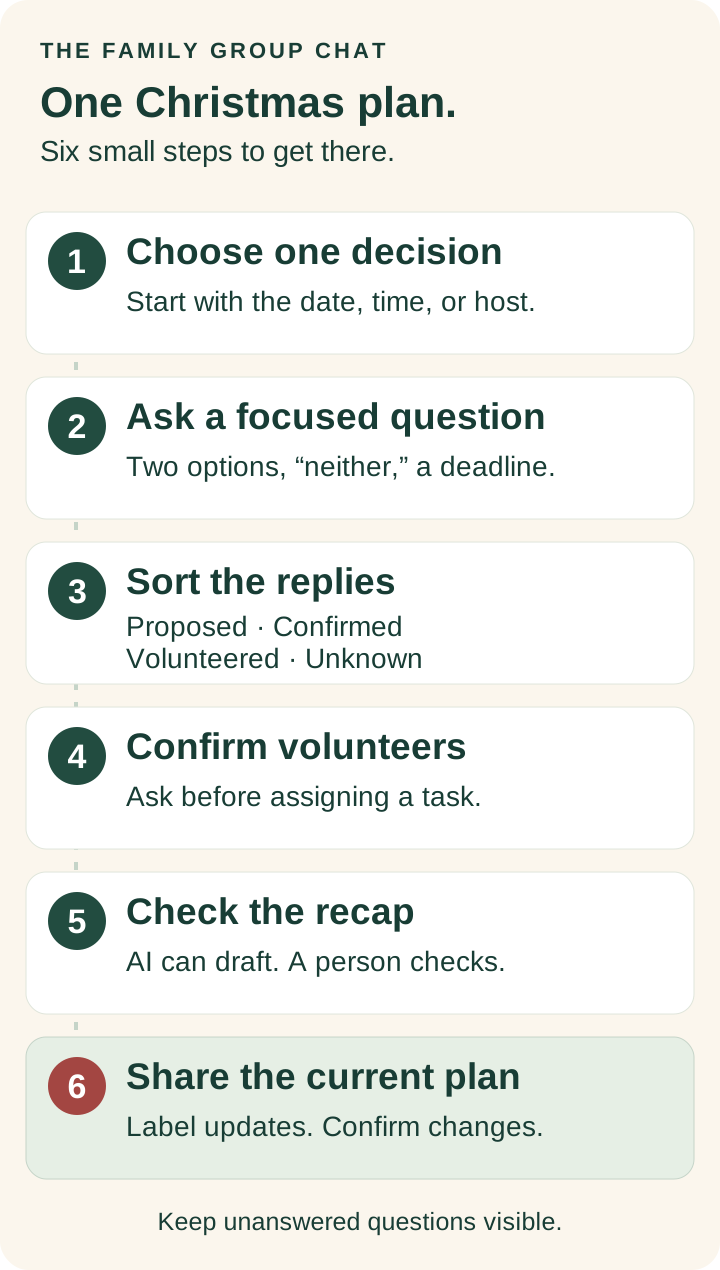
Step 1: Choose one decision
Write the next decision in one sentence: “Choose a time for our Christmas meal.” Leave gifts, travel, and the menu for separate questions. “What are we doing for the holidays?” is too big to answer in one reply.
- Name the gathering and its actual date.
- Pick the one thing that needs an answer next: the time, host, or location.
- Ask one person to coordinate the replies. Make sure they agree.
The coordinator collects answers and posts the recap. Hosting, cooking, driving, and paying are separate jobs that people must agree to take on.
You are ready for the next step when: you can finish the sentence, “The decision we need today is ___.”
Step 2: Ask a question people can answer
Offer two workable options and a “neither” choice. Include a reply deadline with a date, time, and time zone. If someone is not in the chat, agree on a phone call or another way to include them.
Copy this message and replace every bracketed field before sending:
Christmas meal — choosing a time

For [day, month, date], could you do [time A] or [time B] [time zone], or does neither work?

Please reply by [day, date, time, time zone].

The location is [proposed location / still undecided]. We still need the host to confirm.

I can collect the answers and post one recap. No need to volunteer for food yet.
Do not call a time confirmed just because it has the most votes. Check whether the participating households can actually make it. If neither option works, ask for a new option or adjust the gathering.
Step 3: Sort the replies into four labels
Read each reply and put it under one label in your note:
- Proposed: an idea someone has suggested. “What about 6 p.m.?” belongs here.
- Confirmed: the relevant person has explicitly agreed. “Yes, we can come at 6 p.m.” is a confirmation of that household's attendance at that time.
- Volunteered: someone has accepted a task. “I can bring dessert” is an offer; check the details with the host.
- Unknown: a detail that still needs an answer. “Maybe” and no reply stay here.
A heart emoji can mean “love the idea.” It does not necessarily mean “we will be there.” Ask if the answer is unclear.
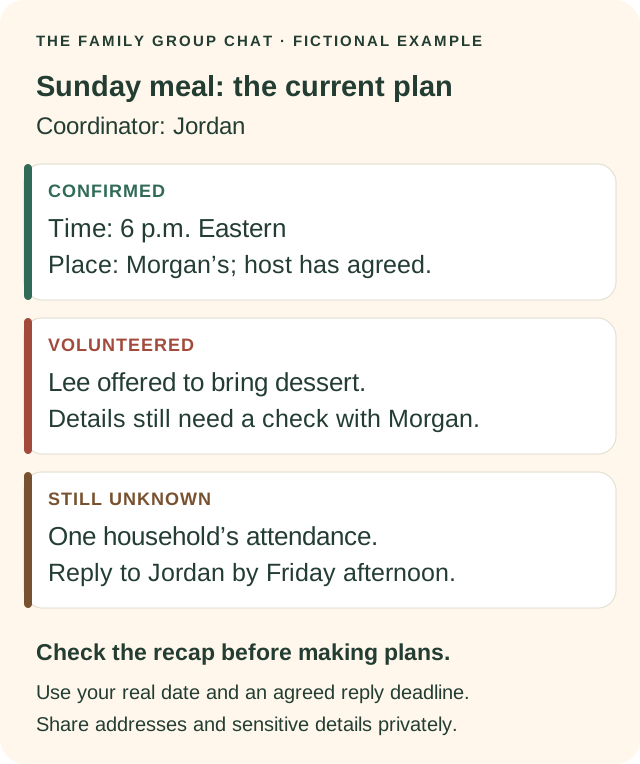
Worked example: Jordan is coordinating, Morgan might host, Lee mentioned dessert, and one household has not replied. At this point, the host and attendance are still open, and dessert is only a suggestion. These names and circumstances are fictional.
Step 4: Confirm volunteers and the practical details
Ask directly before attaching anyone's name to a job. Keep the job small and specific: what, how much, and when it is needed.
Would you like to take on [specific task] for [gathering and date]?

The details would be [what is needed, quantity, and arrival time]. It's completely fine to say no or suggest something smaller.

Please confirm with [coordinator or host] by [deadline]. Until then, we'll leave it open.
Confirm the host, start time, number attending, and any shared costs before people shop or make travel arrangements. Share an address privately when needed. Check food needs directly with the people involved; keep personal health details out of shared AI prompts.
In our example, Morgan now explicitly offers to host, the participating households confirm 6 p.m., and Lee agrees with Morgan on dessert. One household's attendance remains unknown. That is enough to write an honest current plan.
Step 5: Draft the recap and check it
You can write the recap yourself using the card below. If you want AI to tidy it, open your preferred AI chat, start a new conversation, and use fictional names with only the details the draft needs. Replace the placeholders with real details yourself after checking the output.
- Copy the prompt below into the AI chat.
- Replace the final placeholder with your brief, non-sensitive notes.
- Read the draft beside the original replies.
- Check every name, date, time zone, location, and task. Keep “maybe” as “maybe.”
Turn these notes into a short proposed family-plan recap.

Use the headings Confirmed, Volunteered, and Still unknown.

Do not infer attendance, permission, availability, purchases, reservations, or anyone's willingness to help. Keep unanswered questions visible. If notes conflict, ask a question instead of choosing an answer.

Keep the recap under 150 words. Do not send it anywhere.

Notes: [paste only the non-sensitive facts needed for this draft]
The prompt is an instruction, not a guarantee. AI can still misread a reply or invent a commitment. A person needs to check the finished message before sharing it.
Copy the one-plan card
Keep a blank version in your notes. Fill it in for a meal, gift exchange, family visit, or Christmas Eve outing. Replace the placeholders; remove fields that do not apply.
[Gathering] — current plan
Updated: [date and time]

Decision: [what we are deciding]
Coordinator: [person who agreed to collect replies]
Options, if still open: [A / B / neither]
Reply by: [date, time, time zone]

CONFIRMED
Date and time: [agreed details]
Place: [confirmed host/location; share address privately]
Attending: [only the people or households who said yes]

VOLUNTEERED
[Person] — [accepted task and agreed details]

STILL UNKNOWN
[Open question] — reply to [coordinator] by [deadline]

If anything is wrong or changes, tell [coordinator], who will post the corrected recap.
Here is the completed version for our fictional Sunday meal. For your family, add the actual gathering date and reply deadline:
Sunday meal — current plan
Confirmed: 6 p.m. Eastern, agreed by the participating households. Morgan has offered to host. Address shared privately if needed.
Volunteered: Jordan is coordinating. Lee has agreed with Morgan to bring dessert.
Still unknown: One household's attendance. Please reply to Jordan by the agreed Friday-afternoon deadline.
Tell Jordan if anything in this recap is wrong before making arrangements from it.
Step 6: Share one current plan
Post the checked recap in the group chat. Pin it if your chat supports pinning; otherwise say, “This is the current plan,” and keep a copy in a shared note everyone can access. Reach anyone who does not use the chat through the method you agreed on.
If something changes, post a clearly labelled update. State the change and ask affected people to reconfirm. A new time is a proposal until those people agree.
PLAN UPDATE — [gathering and date]

Proposed change: [what changed and the new option].
Still the same: [details that have not changed].

Please confirm whether this works by [date, time, time zone]. I'll post the revised plan once the affected people have replied.
Final check: can someone find the current time, place, their volunteered task, and the unanswered question without reading the entire thread? If yes, the recap is doing its job.
Keep the rest of the holiday small
Once the basic plan is agreed, visit Holiday HQ for ideas or pick one of our 24 activities to try together. If travel is involved, use the family holiday travel checklist. If the plan asks more than someone can give, start with holiday boundaries.
Want more things worth sending? Join the Group Chat for optional email updates. This guide and its templates are free to use without subscribing.
Original planning card and fictional worked example by Ashley Kays for The Family Group Chat. Cover: AI-generated holiday planning illustration. No private family messages were used.